


Hosting Controller AD Connect Sync

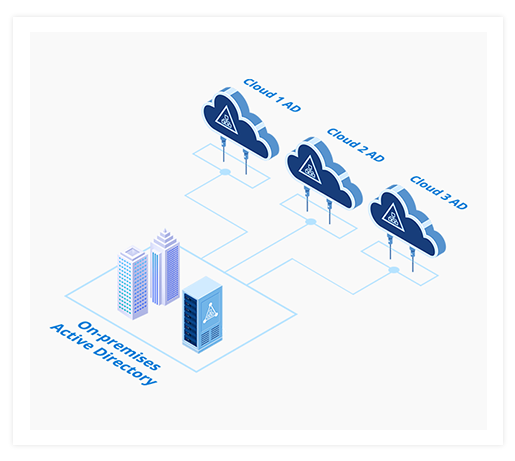
One-to-Many Synchronization

Synchronize from one source to multiple Cloud Active Directories.

AD SyncPasswordsIdentities
One-to-Many

Synchronization for Distributed Applications

Synchronize users from a single on-premises Active Directory to multiple cloud Active Directories. Each independent cloud Active Directory can have its own settings. Specify some objects of an OU to synchronize with one cloud AD and some with another. Even synchronize a single user with more than one cloud ADs simultaneously.

Useful Active Directory Connector

No need to manage users in two places when it can be done in one.

Connector

Synchronize Passwords, Identities, and Groups

Synchronize Passwords

Keep your AD passwords synchronized across your internal and external Active Directories. Make it easier for administrators to replicate and track password changes across Active Directories.

Synchronize Identities

Perform one-way synchronization of identity data (users, groups) between an on-premises Active Directory and your hosted Active Directory. Manage account changes across multiple systems.

Synchronize Groups

Reflect group changes made in an on-premises Active Directory to the hosted environment in real-time. Provide a complete and efficient identity management solution to your business.

Features

Real-Time Synchronization Features

  • Synchronize Users: Push newly provisioned users to the hosted/Cloud environment.
  • Synchronize User Passwords: Intercept changes to user passwords on the on-premises AD in real time and replicate to related user object on the hosted AD.
  • Synchronize User Attributes: Sync any changes to user attributes such as displayName, company, mobile etc.
  • Synchronize Groups: Push newly created Distribution and Security groups to the hosted/Cloud environment.
  • Synchronize Required Users: Choose required few users, groups and contacts from a specific organization (OU) to be synced.
  • Change Group Membership: Reflect any membership changes to the Cloud environment.
  • Synchronize Contacts: Replicate new contacts seamlessly between on-premises and Cloud.
  • Transfer Securely: Send requests securely over LDAPs.
  • Implement Self-Serve: Allow users to reset their own passwords.

Use Case

Use Case

Understand the rationale for using AD Connect Sync.

Read Local Repositories

When applications are running distributed into many clouds, a local repository hosted close to the application has many benefits. If the application is made to access a remote repository, the latency and bandwidth requirements are huge. If the application only needs a subset of AD attributes, AD Connect Sync can be made to copy only the required parameters.

Local Repositories
One-to-Many

Deployment Topology

As your organization evolves and finds its optimum mix of on-prem and cloud based services, AD Connect Sync tool is there to support synchronization across multiple clouds.

  • One Source - Multiple Destinations
  • Distributed Applications
  • Independent Settings for Each Cloud
  • Single User - Synchronized Across All Target ADs

Why AD Connect Sync?

Why AD Connect Sync?

There are plenty of good reasons to use AD Connect Sync for synchronizing your on-premises identities with those in the Cloud. The most important ones are:

AD Connect Sync implementation

Implementation

AD Connect Sync is far easier to implement than other more complex options. Installing and configuring AD Connect Sync simply involves a few one-time configuration steps. AD Connect Sync is a simple service which requires an installation over the primary (or additional) domain controllers. Once installed, AD objects can be selected to initiate the sync process between the ADs.


AD Connect Sync complexity

Complexity

AD Connect Sync does not require a two-way trust relationship to be established between domains neither does it demand the added complication of deploying an ADFS infrastructure. No additional servers, SSL certificates or DNS entries are required.

AD Connect Sync cost advantages

Cost

Costs can be cut into half or even more by deploying AD Connect Sync. There are no additional costs to consider above those of the licenses whereas other more expensive alternates like ADFS require additional server licensing, SSL certificates, hardware costs and/or virtual infrastructure resources and consultancy costs.

Have Questions?

Contact Now