


Hybrid Microsoft 365

Microsoft 365 API

Essential tool for any DevOps teams tasked with automation of Microsoft 365 cloud.

REST APIsHybrid DeploymentMulti-Tenant
REST API
Microsoft 365

Hybrid Deployment

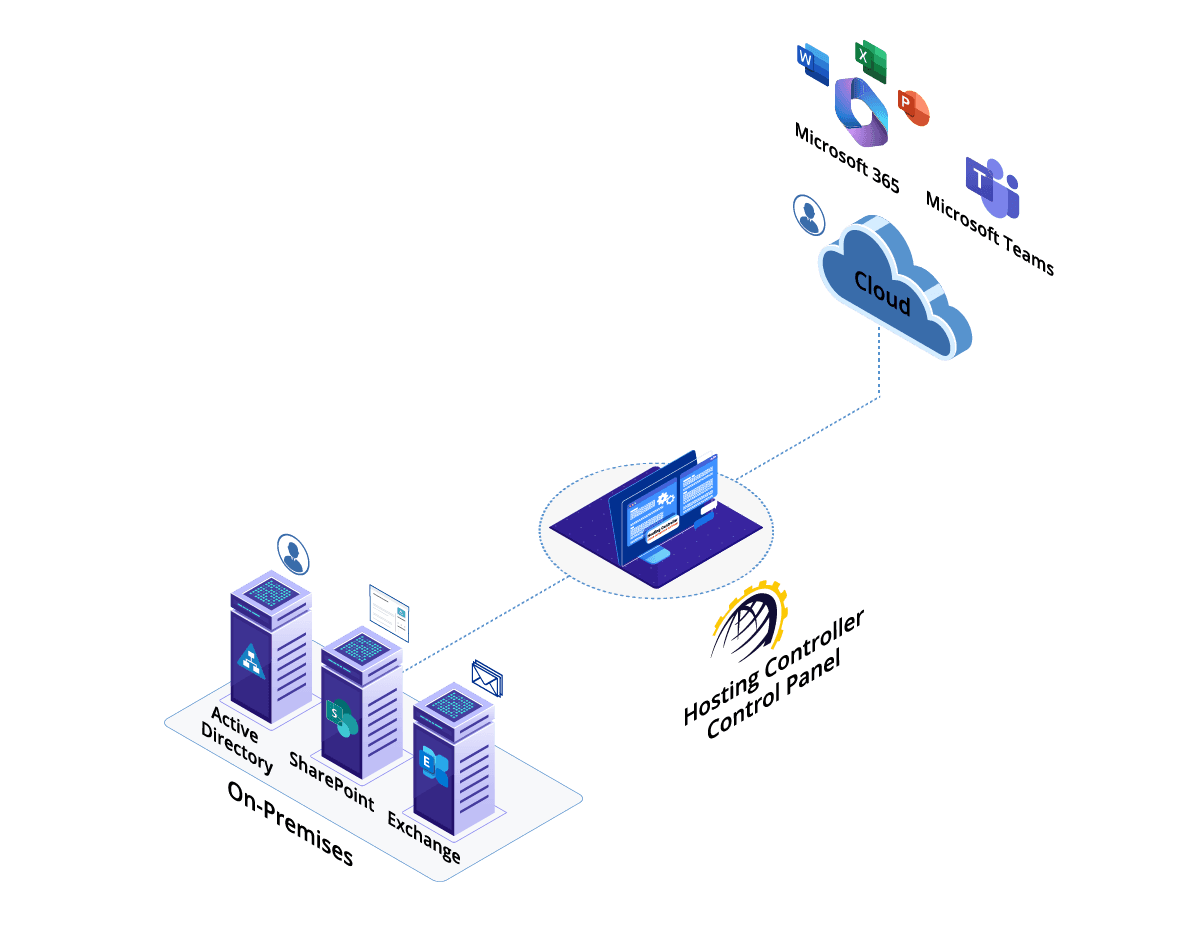
Microsoft Teams and Exchange On-premises. Enjoy the best of both worlds! Keep your Exchange mailboxes, SharePoint sites, and Active Directory on-premises, and use Microsoft Teams and Microsoft Office from the Microsoft 365 cloud. Allow Hosting Controller to manage your coexistence between the two environments. Control your enterprise applications from the comfort of familiar on-premises setups while still using popular cloud applications like Teams from the cloud.

  • Microsoft Teams and Microsoft 365 Suite – in the Cloud
  • Exchange, SharePoint, and Active Directory - On-premises
Hybrid Microsoft 365 with Teams in the cloud and Exchange on-premises

REST APIs

Utilize our easy-to-use RESTful APIs to automate your Microsoft 365 organizations. Our APIs can be consumed in any scripting language that consumes REST APIs like Node.js, Django, .NET, or Laravel.

Let's Talk
Hosting Controller deployed for Microsoft 365 tenant administration

Deployment

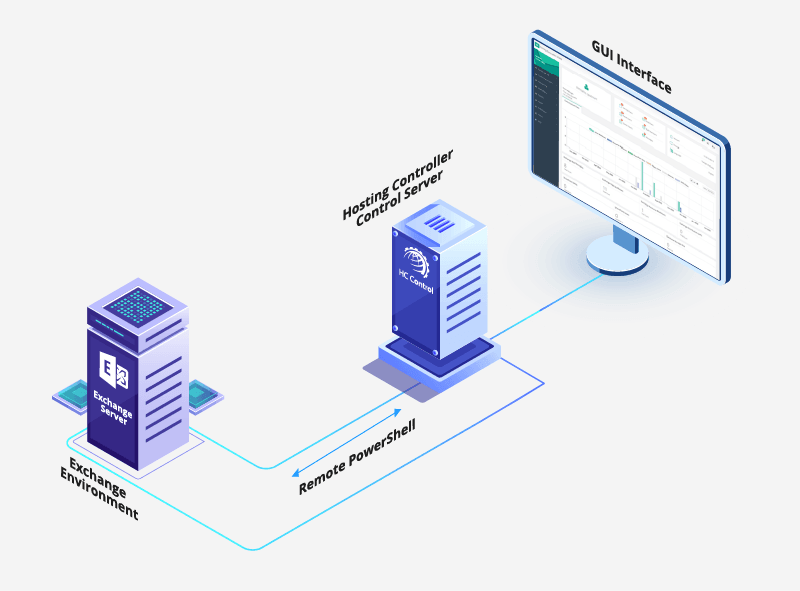
In case you want to manage your Microsoft 365 tenants through GUI based menus, deploy Hosting Controller on any Windows server, on-premises or in the cloud, and start administering your Microsoft 365 tenants with ease.

See Azure Marketplace VMs

Security

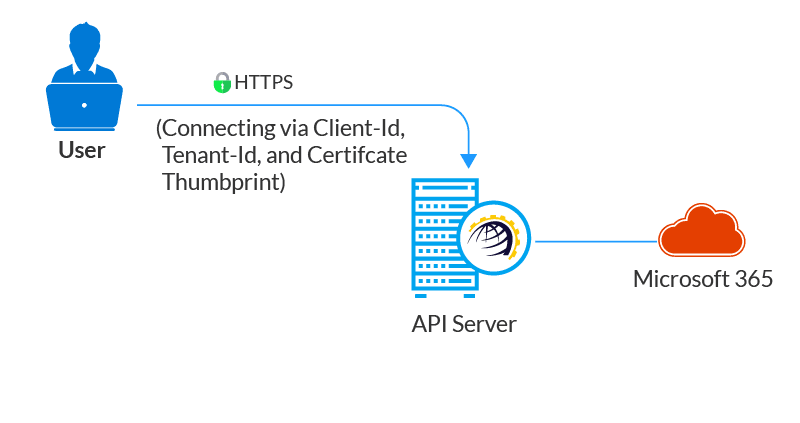
Hosting Controller uses an advanced authentication mechanism to connect to the Microsoft 365 tenant. It doesn't use a username and password for connectivity, rather it uses token based authentication.

  • API Server to Microsoft 365 — app-only access with Client-Id, Tenant-Id, and Certificate Thumbprint
  • HC Control Panel to API Server — HTTPS with token authentication
Token-based security between Hosting Controller, the API server, and Microsoft 365
API audit logs showing actions, IP addresses, timestamps, and HTTP verbs

Audit Trail

The audit logs in Hosting Controller provide a convenient way to track down operations performed by the API for example creating a new user in the Microsoft 365 organization. The audit trail includes the actions performed, IP logs, time stamps, and HTTP verbs besides other useful details.

Control Panel Features

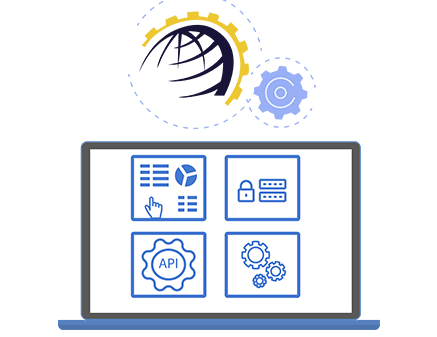
Our API is part of a complete control panel offering:

  • GUI Based Dashboards
  • Self-Serve Portals
  • Extra Layer of Multi-Tenancy
  • Reporting and Analytics
  • Audit Logs
  • Necessary Import Tools
Microsoft 365 control panel features including dashboards and self-serve portals

Some Sample Scripts

On the Postman UI, hit the import button in the left pane and paste the cURL code in it. This generates a complete request in Postman. Just replace the dummy values with actual values to send a valid request to the endpoint.

Update User Licenses

PUT /office365/{organizationId}/users/{userId}/licenses

Updates user licenses and enables/disables service plans within a license.

curl --location --request PUT 'http://localhost:8798/office365/{OrganizationId}/users/{UserId}/licenses' \
--header 'Content-Type: application/json' \
--header 'Authorization: Basic aGNhZG1pbjpoY2FkbWlu' \
--data '{
    "SelectedSubscriptions": [
    {
       "ServicePlans": [
         {
           "ServicePlanId": "{ServicePlanId}"
         }
       ],
       "O365SubscriptionId": {O365SubscriptionId},
       "UpdateOnlyServicePlans": true
     }
   ],
   "UserLicenses": [
     1
   ]
}'

Add User

POST /office365/organizations/{organizationId}/users

Creates new user in the organization.

curl --location 'http://localhost:8798/office365/organizations/{OrganizationId}/users' \
--header 'Content-Type: application/json' \
--header 'Authorization: Basic aGNhZG1pbjpoY2FkbWlu' \
--data-raw '{
    "DisplayName": "Example User",
    "EmailAddress": "example@domain.onmicrosoft.com",
    "FirstName": "example",
    "LastName": "user",
    "MailDomainName": "domain.onmicrosoft.com",
    "Password": "P@ssw0rd",
    "SelectedSubscriptions": [
     {
       "O365SubscriptionId": {O365SubscriptionId}
     }
   ],
    "UserName": "example",
    "UserSubscriptions": [
     1
   ]
}'

Update Password

PUT /office365/users/{o365UserId}/password

Updates user password.

curl --location --request PUT 'http://localhost:8798/office365/users/{UserId}/password' \
--header 'Content-Type: application/json' \
--header 'Authorization: Basic aGNhZG1pbjpoY2FkbWlu' \
--data-raw '{
    "Password":"P@ssw0rd"
}'

Why Hosting Controller?

Hosting Controller provides the necessary business layer over the otherwise distinct, unique, and secluded Microsoft 365 tenants. In other words, it serves as a face for any sizable enterprise or government organization offering Microsoft 365. It provides a full spectrum of services including domain, user, and subscription management for Microsoft 365 organizations, and enables a single enterprise to manage multiple 365 tenants through a single interface.

Contact Us

Take Your Business to the Next Level

Schedule a Consultation