ExSign Microsoft Exchange Email Signatures Management Software
Email Signature Software for Exchange Server.
Email Signatures and Disclaimers for Microsoft Exchange
ExSign is a smart email signature solution designed for Microsoft Exchange administrators. It enables them to append professional signatures and disclaimers to all outgoing messages. Using ExSign, you can centrally manage them through a web portal, allowing the software to apply them based on pre-defined rules. With coherent organization-wide signatures, it helps maintain consistency across all your company's emails, transforming them into an engaging marketing channel.
Banners and Icons
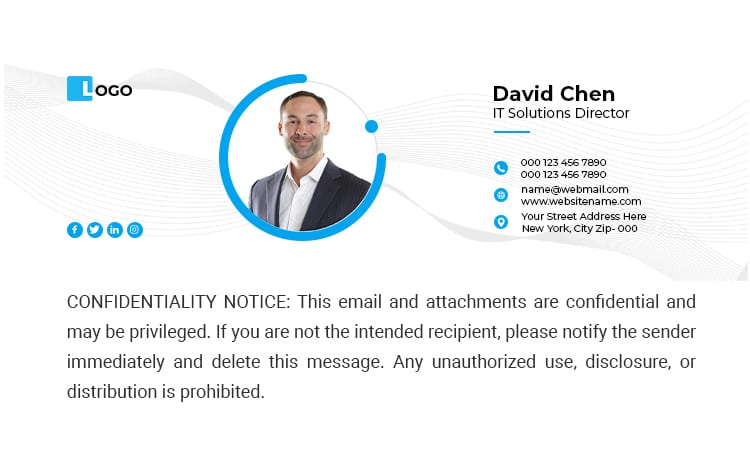
Add promotional banners, logos, and social media icons to your signatures and ensure that new announcements, exclusive offers, achievement awards, etc. are always in front of your customers, and that too at no cost. Thanks to the role-based access control built into the solution, delegate banner management to your marketing and sales team, relieving your IT staff of the nitty gritty.
Every signature capability, in one web-based tool
ExSign gives administrators a single, browser-accessible portal for every part of signature management, from access control to reporting.
Web-Based Tool
Powerful, browser-accessible, self-served email signature solution.
Multi-Level Access
Fine-grained access control through multiple user levels.
Bilingual Interface
Central interface available in two international languages, English and Arabic.
Reporting and Analytics
Extensive reports and insights for analyzing signature data.
Ready-to-Use Templates
Ease of signature deployment with easy-to-use, pre-defined templates.
Separate Rules for Signatures and Disclaimers
Distinct rules for signatures and disclaimers.
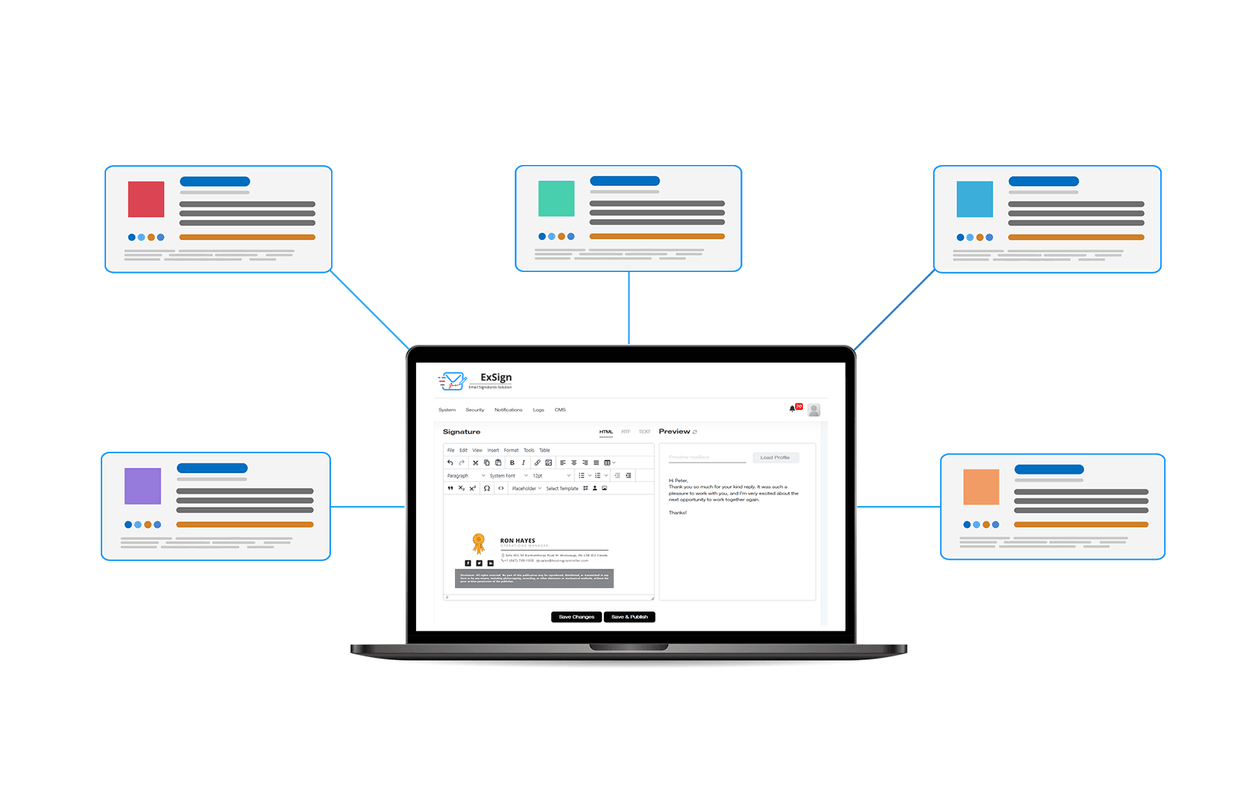
There are plenty of good reasons to use ExSign for your email signatures
In large organizations it becomes difficult for an administrator to visit each employee's desk to set up new signatures. ExSign makes signature management easy with full control from one central location, so every email stays consistent and compliant, no matter which device it was sent from.
- Central Management: define rules once and let ExSign decide which signature or disclaimer to add to which email, instead of visiting every employee's desk
- Consistency: pre-defined rules ensure everyone in your company uses the same signature and disclaimer, with no distorted images, logos, fonts, or colors
- Most Devices Supported: server-side rules add professional signatures and disclaimers to emails sent from mobiles, tablets, Android, and iOS
- User profiles pulled directly from Active Directory, including custom attributes
- Legal disclaimers and compliance text applied automatically to every outgoing email
Everything ExSign Manages for Microsoft Exchange
From central administration to legal disclaimers, every capability of ExSign for Microsoft Exchange is built around one goal: consistent, compliant signatures on every outgoing email.
Manage Signatures Centrally
Allow users to add Microsoft Exchange email signatures and disclaimers to a central interface. Enable global administrators to gain a bird's-eye view of all the rules and content across multiple Exchange environments in one place and administer them accordingly.
- Delivered in HTML, Rich Text, or Plain Text format
- Compatible with Exchange Server SE, 2019, and 2016
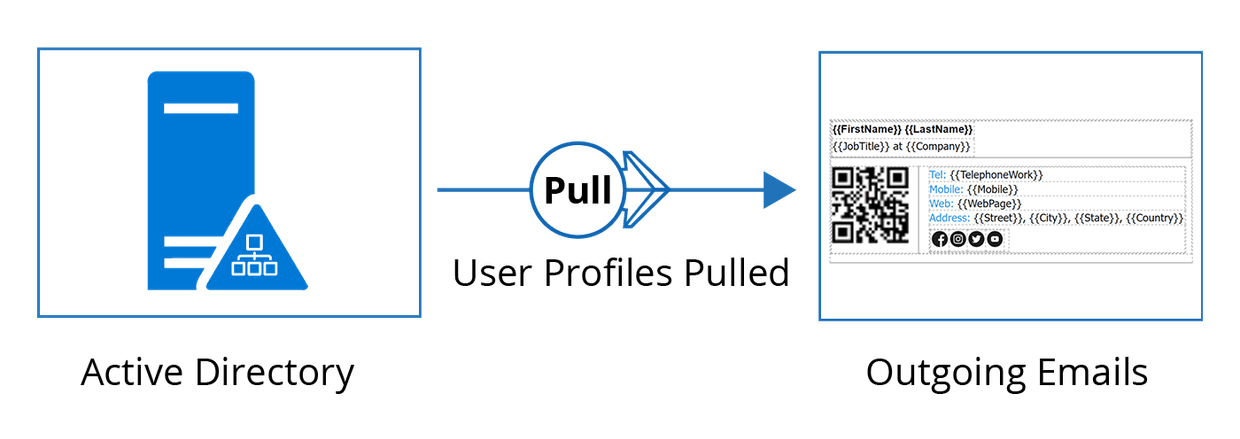
User Profiles Pulled Directly from Active Directory
Stay accurate with user profiles pulled directly from Active Directory. Information pulled directly from Active Directory guarantees accurate contact details on all outgoing emails.
- Use all Active Directory attributes, including custom attributes
- Pull user photos directly from the thumbnail attribute
Multi-Tenant and Multi-Server Exchange Environments
Ensure full segregation of user signatures based on exclusive Exchange environments, organizational units (OU) within Exchange sites, and UPN suffixes. Capable of supporting organizations of all sizes, including organizations with multiple mailbox servers configured in DAG.
- Full segregation by organizational unit (OU) and UPN suffix
- Supports multiple mailbox servers configured in DAG

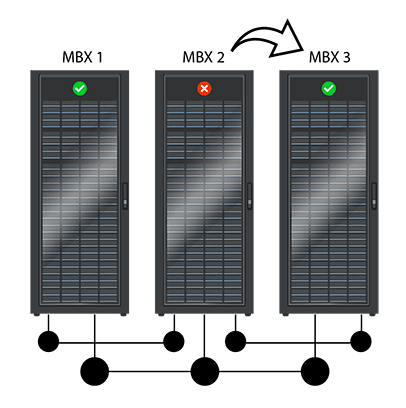
Always Highly Available
Always remain highly available with stamping from all mailbox servers. The ExSign Transport Agent is installed on all the Exchange mailbox servers in an Exchange environment, enabling stamping from each mailbox server. This ensures high availability in case of failure: if a mailbox server goes down, the stamping process continues unabated from the other mailbox servers.
- ExSign Transport Agent installed on every Exchange mailbox server
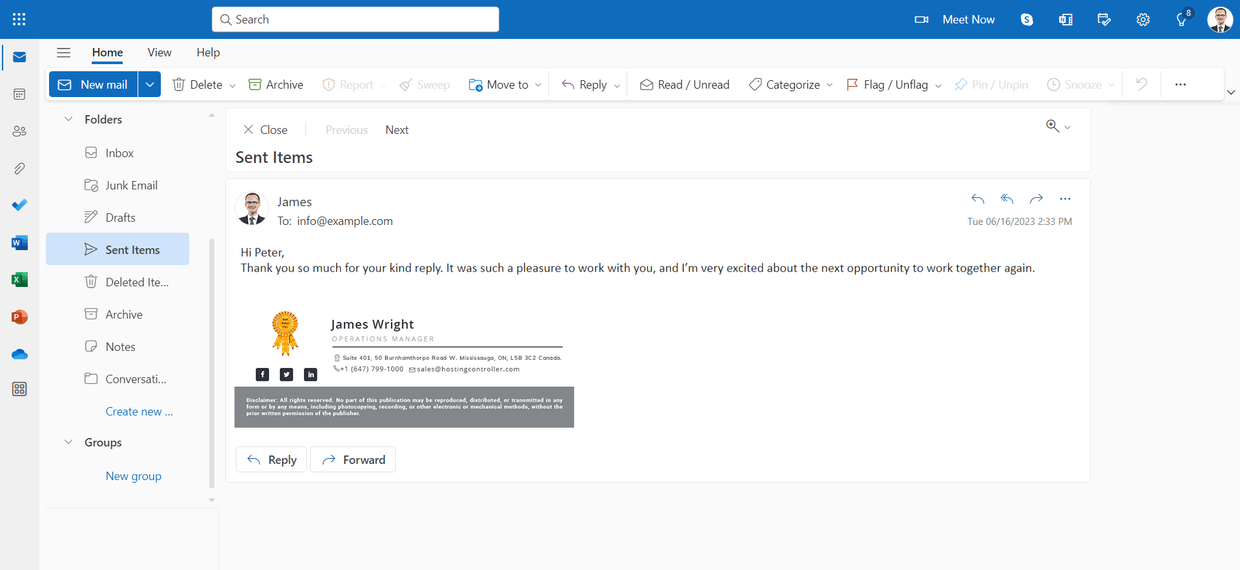
Sent Items Update
See signatures and disclaimers in the sent items folder after emails have been sent out. Normally users cannot see signatures and disclaimers when emails are being dispatched and don't know how they look. With ExSign, experience how they look with the sent items update feature.

Time Based Rules
Define time intervals as conditions for your rules. These conditions will determine when to add signatures to emails sent by your organization. Time intervals can be specified in days, active hours, or date ranges.
Legal Disclaimers
Stay compliant with email disclaimers. Take advantage of centrally defined disclaimers to clearly communicate required notices, legal boundaries, and policy obligations to your recipients, especially across regulated industries.

vCards
Create stunning digital business cards that stand out and make sharing effortless. Embed QR codes directly in your email signatures so recipients can scan and connect instantly. Design from scratch or choose from a range of sleek, professionally crafted templates.
ExSign Works With
ExSign is part of a wider email signature suite from Hosting Controller, giving you a consistent management experience whether your organization runs Microsoft Exchange, Microsoft 365, or Google Workspace.

ExSign for Microsoft Exchange Current
Centrally manage and deploy email signatures across your on-premises Microsoft Exchange environment with full Active Directory integration.
You are here
ExSign for Google Workspace
Manage Gmail signatures organization-wide from a single admin portal, applied server-side to every outgoing message on every device.
Learn more
ExSign for Microsoft 365
Deploy consistent email signatures across your Microsoft 365 tenant without any client-side installation, as a fully cloud-based SaaS solution.
Learn moreHow Does ExSign Work with Microsoft Exchange?
ExSign connects to Active Directory, pulls user data automatically, builds signatures from your branded templates, and injects them server-side into every outgoing email, all without requiring any action from your users.
Install
Deploy the ExSign Transport Agent across your Exchange mailbox servers in minutes.
Design
Build signature templates with the drag-and-drop editor: logos, banners, and legal disclaimers.
Assign
Apply rules by organizational unit, department, or UPN suffix for precise targeting.
Deploy
Signatures and disclaimers are stamped server-side on every outgoing email, with zero end-user action.
What Can ExSign Do for You
Supported Versions
Choose from a wide range of supported Exchange Server versions.



"With ExSign, managing email signatures has become efficient and hassle-free. The solution provides centralized control, consistent branding, and reliable disclaimer management, resulting in improved governance and reduced operational overhead."