HOSTING CONTROLLER 8 MANUALS :: Host Admin |
|
HOSTING CONTROLLER 8 MANUALS :: Host Admin |
|
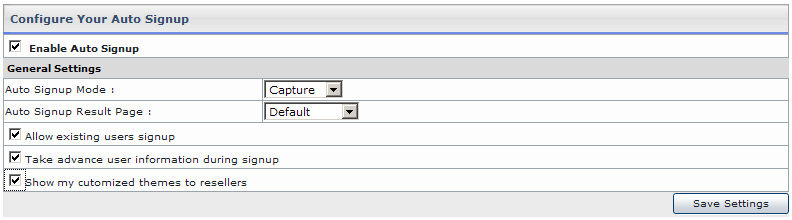
It enables you to enable Auto Signup and configure few settings:
Click Auto Signup menu under the Toolbox section.
Tick the “General Settings”, under General Configurations section.
Select Enable Auto Signup to allow auto signup feature.
In General Settings section, select your required information:
Auto Signup Mode allows you to intimate your payment gateway to either capture/authorize the Auto Signup form as soon as it is submitted.
Auto Signup Result Page allows you to select the result page for the Auto Signup. You can set it as "Default" or "Custom URL". It display the default HC page for results or allow you to upload your own page respectively.
Select Allow existing users signup if you want to allow your existing users to access the Auto Signup by specifying their login credentials.
Selecting Take advance user information during signup prompts for the advance level information from the user during signup process.
Select Show my customized themes to resellers if you want your customized themes to be viewed by the resellers.
Press the Save Settings button